RAG 시스템을 만들다 보면 벡터 검색만으로는 설명하기 어려운 지점이 생긴다.
문서 chunk는 “비슷한 문장”을 찾는 데는 좋지만, 여러 문서에 흩어진 사람·회사·제품·사건이 어떻게 연결되는지, 답변이 어떤 entity와 relationship을 따라 만들어졌는지, 사용자가 결과를 그래프로 검토할 수 있는지는 별도 구조가 필요하다.
neo4j-labs/llm-graph-builder는 이 문제를 Neo4j답게 푸는 오픈소스 웹 애플리케이션이다.
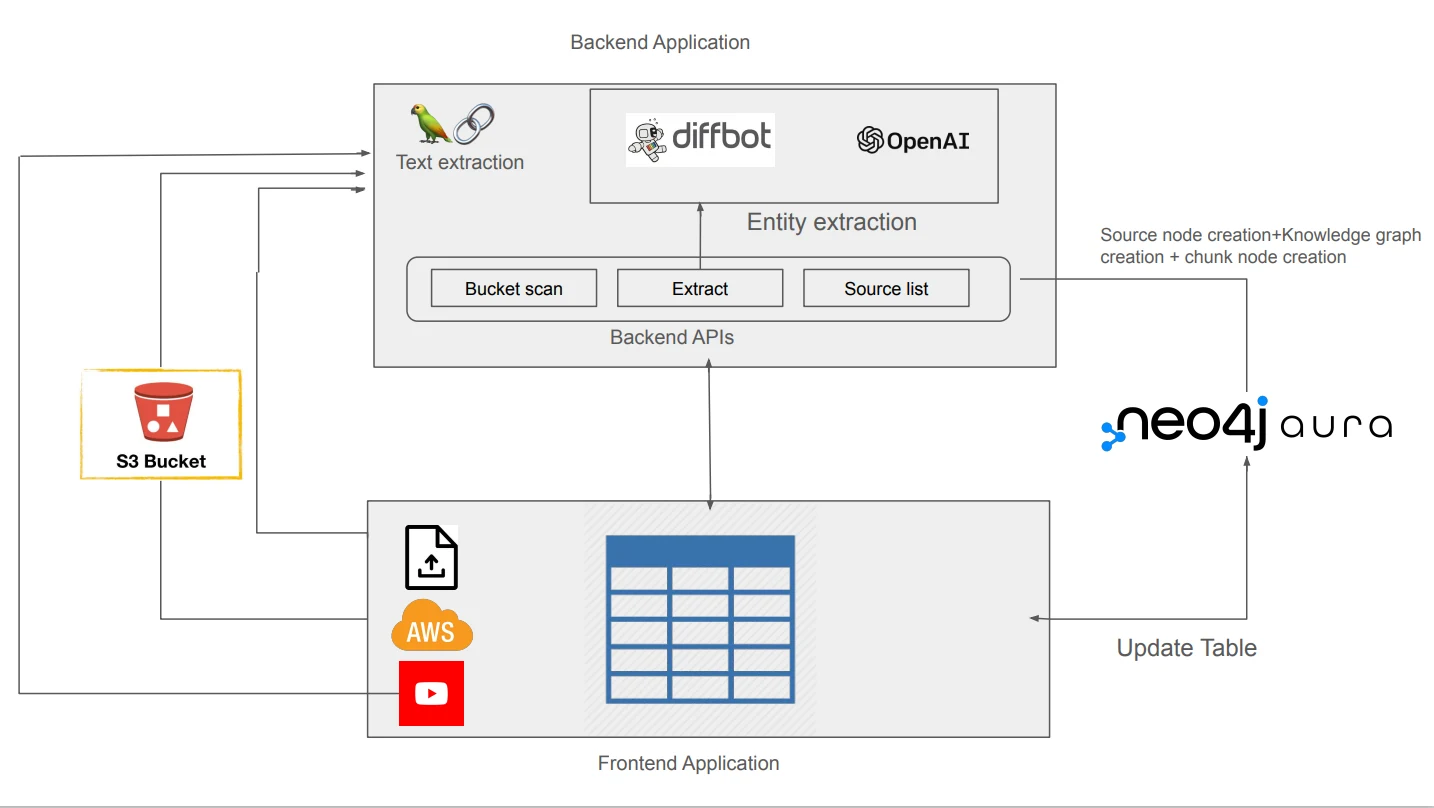
PDF, 문서, 웹 페이지, YouTube transcript, Wikipedia, S3/GCS 같은 비정형 소스를 넣으면 LLM과 LangChain 계열 로더/graph transformer를 통해 Neo4j 안에 lexical graph와 entity graph를 만든다.
이후 사용자는 그래프를 미리 보고, Neo4j Bloom/Workspace로 열고, chatbot에서 GraphRAG 방식으로 질의할 수 있다.
내가 보기에 이 저장소의 중심은 “LLM이 알아서 좋은 지식 그래프를 만들어 준다”가 아니다.
더 정확히는 문서 ingestion, schema-guided extraction, graph visualization, GraphRAG 질의, evaluation/post-processing을 한 화면의 실험실로 묶은 Neo4j용 그래프 구축 앱에 가깝다.
그래서 라이브러리라기보다는 GraphRAG 프로토타입과 내부 데이터 검토 workflow를 빠르게 시작하는 제품 표면으로 읽는 편이 맞다.
무엇을 해결하려는가
문서 기반 GraphRAG를 직접 만들려면 의외로 많은 주변 작업이 필요하다.
파일을 업로드하고, 웹 페이지와 YouTube transcript를 읽고, chunk를 만들고, embedding을 계산하고, vector index를 만들고, entity와 relationship을 뽑고, 원문 chunk와 entity를 다시 연결하고, 사용자가 그래프를 확인할 수 있는 UI까지 붙여야 한다.
여기에 schema를 직접 지정하거나, 기존 Neo4j database의 schema를 참고하거나, post-processing으로 duplicate entity를 정리하는 단계까지 들어가면 단순 RAG 샘플을 넘어선다.
LLM Graph Builder는 이 과정을 앱으로 낮춘다.
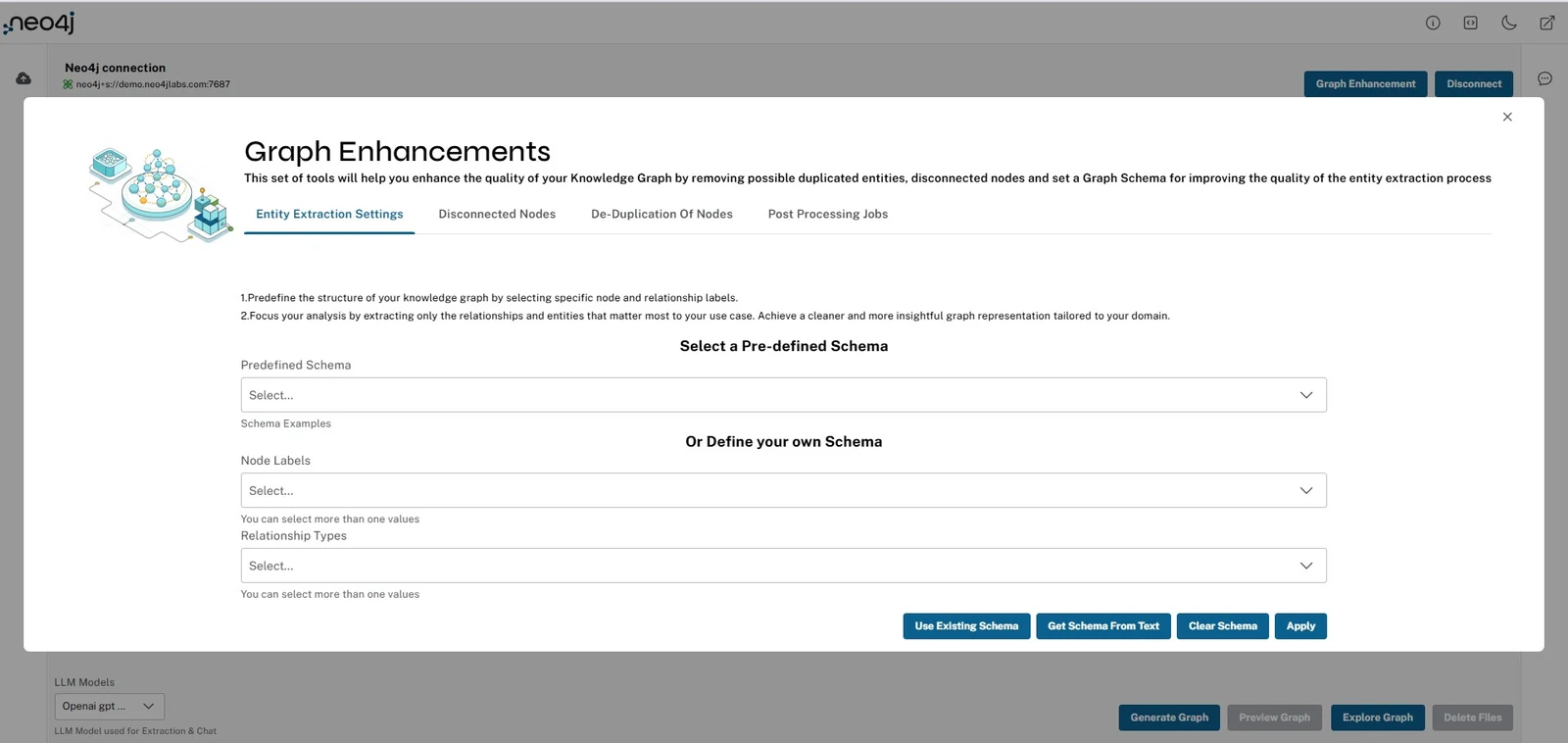
사용자는 Neo4j Aura 또는 접근 가능한 Neo4j instance에 연결하고, source를 올리고, 사용할 LLM과 embedding 설정을 고른 뒤, 필요한 경우 graph schema를 설정한다.
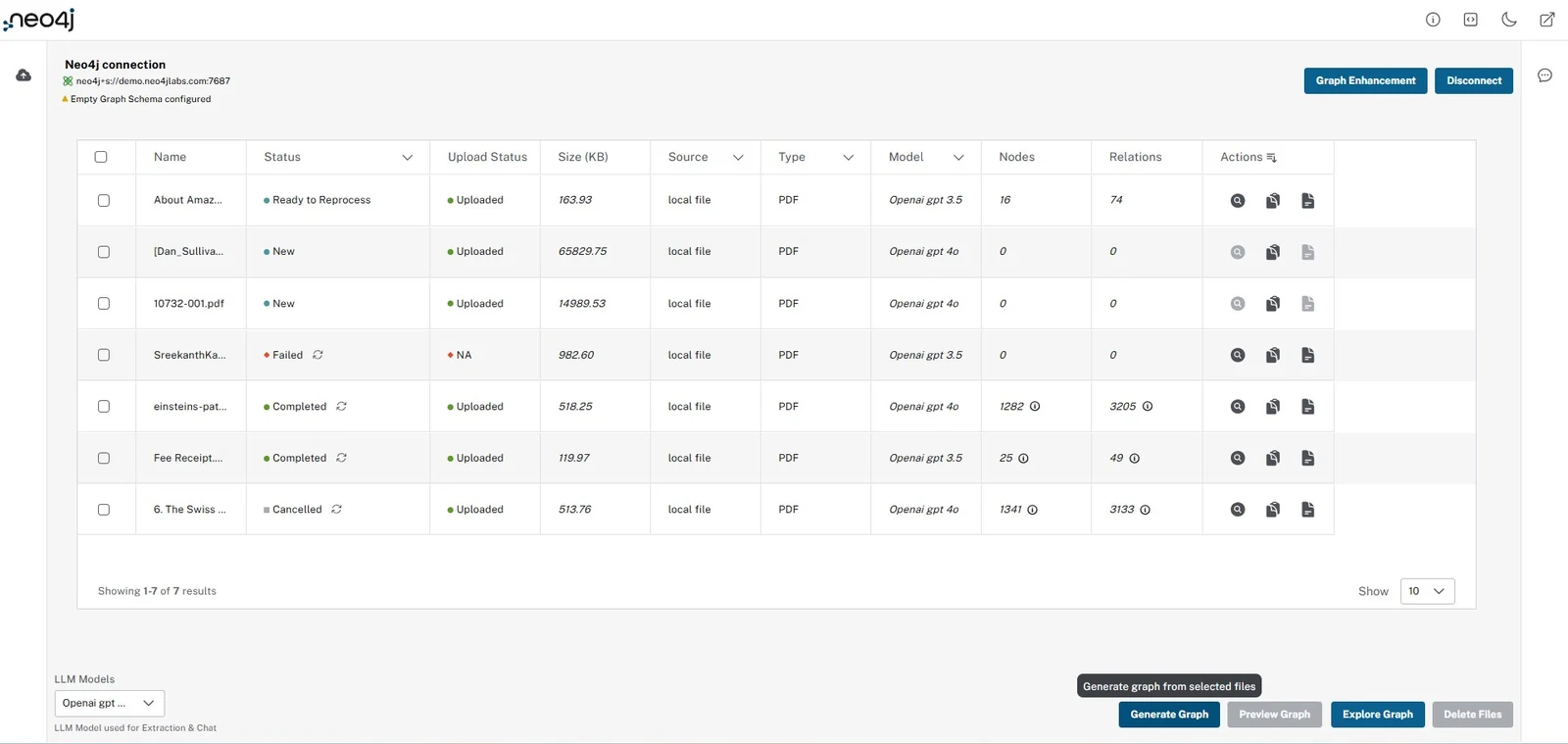
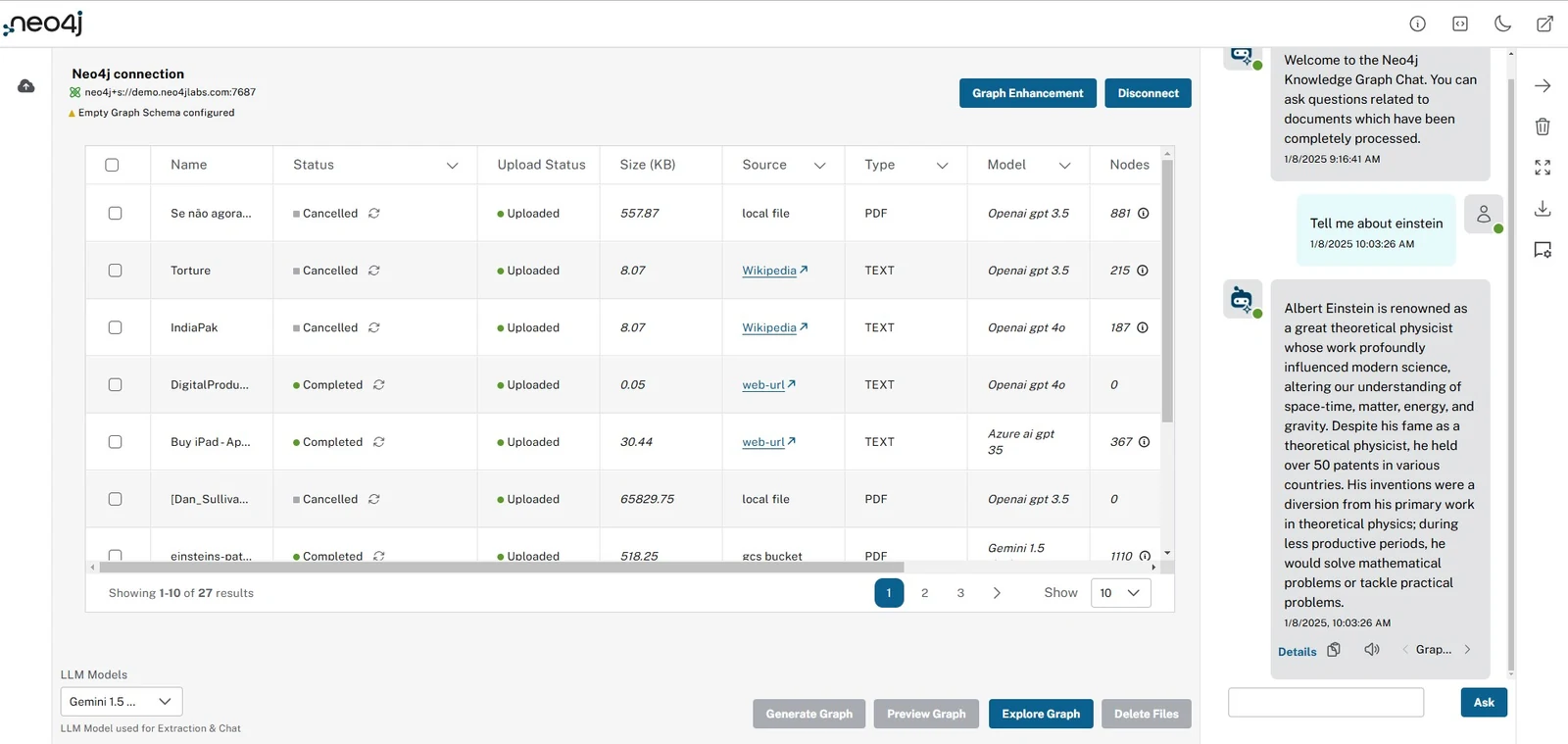
생성이 끝나면 file table에서 source별 node/relationship count와 상태를 보고, graph preview에서 lexical graph, entity graph, full knowledge graph를 확인한다.
Neo4j Labs 문서는 이 도구가 특히 long-form English text, PDF, text-heavy document, schema-guided knowledge graph extraction에 잘 맞고, Excel/CSV 같은 tabular data나 이미지·다이어그램·슬라이드 중심 자료에는 덜 적합하다고 적는다.
이 caveat가 중요하다.
Graph Builder는 OCR/문서 이해 만능 도구라기보다, 텍스트를 그래프 구조로 바꾸는 GraphRAG 준비 도구에 가깝다.
핵심 구조: lexical graph와 entity graph를 함께 만든다
Neo4j Labs 설명에서 가장 중요한 구분은 lexical graph와 entity graph다.
| 층 | 무엇을 담나 | 왜 필요한가 |
|---|---|---|
| Lexical graph | Document node, chunk, chunk 간 연결, embedding, vector index, 유사 chunk의 SIMILAR 관계 |
원문 근거와 retrieval 시작점을 보존한다 |
| Entity graph | 텍스트에서 추출한 entity node, entity 간 relationship, entity/relationship과 source chunk의 연결 | 여러 문서에 흩어진 개념·사건·조직 관계를 질의 가능하게 만든다 |
| Post-processing graph | kNN 관계, community cluster, community summary, full-text index, duplicate/disconnected node 정리 | GraphRAG retrieval과 운영 검토에 필요한 그래프 품질을 보강한다 |
작동 방식은 대략 이렇다. source가 들어오면 LangChain loader가 문서를 읽고 chunk로 나눈다. chunk는 Neo4j에 저장되고 원본 Document와 연결된다. embedding은 chunk에 저장되고 vector index에 들어가며, 유사도가 높은 chunk끼리는 SIMILAR 관계로 묶인다.
그런 다음 llm-graph-transformer 또는 diffbot-graph-transformer가 텍스트에서 entity와 relationship을 추출하고, 그 결과를 chunk와 연결한다.
이 구조의 장점은 답변 근거를 “검색된 텍스트 조각”에만 묶지 않는다는 점이다.
검색은 vector/fulltext에서 시작할 수 있지만, entity relationship과 community summary를 따라가면 문서 밖의 구조적 맥락을 더할 수 있다.
Neo4j의 2025 release post도 이 방향을 강조한다. chunk만 보면 문맥이 약하지만, concept/entity를 뽑아 연결하면 여러 source에 흩어진 정보가 이어진다는 것이다.
앱 표면: source ingestion, schema, graph preview, chatbot
LLM Graph Builder가 일반적인 extraction script와 다른 점은 UI가 작업 흐름 자체를 안내한다는 점이다.
공식 feature 문서와 frontend docs 기준으로 주요 표면은 다음과 같다.
| 영역 | 기능 | 운영상 의미 |
|---|---|---|
| Source ingestion | local file, YouTube transcript, Wikipedia, web page, AWS S3, Google Cloud Storage | 문서 수집과 그래프 생성 source를 한 테이블에서 관리한다 |
| Model/config | OpenAI, Gemini, Diffbot, Anthropic, Fireworks, Groq, Bedrock, Ollama, DeepSeek, OpenAI-compatible endpoint 등 | provider별 extraction 품질과 비용을 실험할 수 있다 |
| Schema control | predefined schema, 직접 입력, 기존 DB schema fetch, text/RDF/Cypher/GQL schema에서 추론 | “무엇을 entity/relationship으로 볼지”를 사람이 조정한다 |
| Visualization | lexical graph, entity graph, full knowledge graph, neighbor view, Bloom/Workspace 연결 | 추출 결과를 사람이 검사하고 탐색할 수 있다 |
| Chatbot | vector, graph, graph+vector, fulltext, graph+vector+fulltext, entity_vector, global_vector modes | GraphRAG와 vector-only retrieval을 같은 데이터 위에서 비교한다 |
| Evaluation | RAGAS faithfulness/relevancy, context entity recall, semantic score, rouge score | 답변 품질을 UI에서 비교·점검할 수 있는 단서를 준다 |
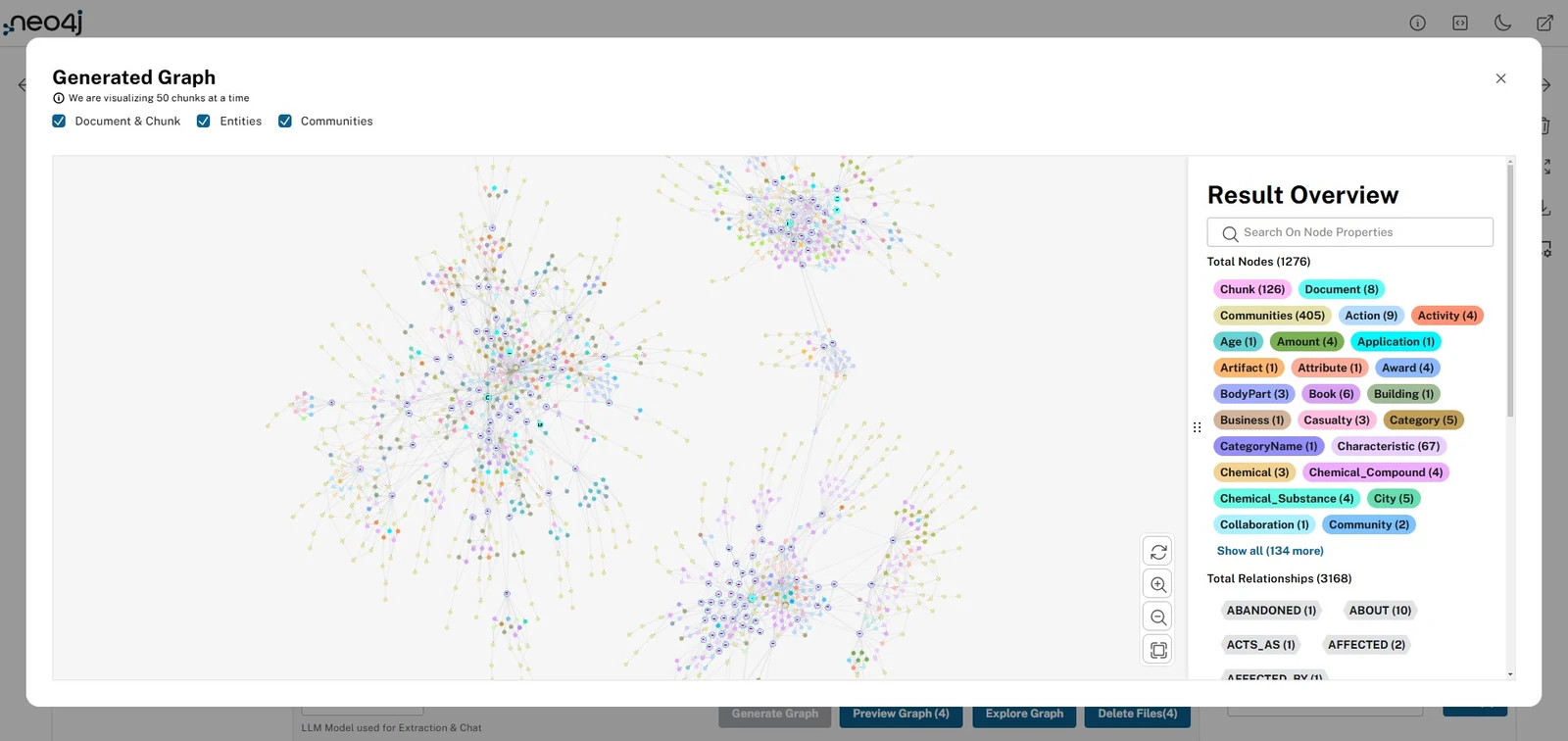
Graph preview는 이 도구의 핵심 UX다.
파일별 또는 선택된 전체 source에 대해 graph를 열고, document/chunk 중심의 lexical graph, entity 중심 그래프, community graph를 나눠 볼 수 있다.
이는 실제 운영에서 중요하다.
LLM extraction은 언제든 누락, 중복, 잘못된 relation type을 만들 수 있기 때문에, 사람의 검토 화면 없이는 지식 그래프 품질을 통제하기 어렵다.
Chatbot도 단순한 “문서 QA”가 아니라 retrieval mode 비교 표면에 가깝다. frontend/src/utils/Constants.ts에는 vector, graph, graph+vector, fulltext, graph+vector+fulltext, entity search+vector, global search+vector+fulltext가 정의되어 있다. backend docs의 /chat_bot 설명은 embedding model, Neo4jGraph, chat history, retrieved chunks/entities/communities를 엮어 답변을 만든다고 적는다.
응답에는 source, retrieved node detail, token usage, response time, metric detail 같은 정보를 담을 수 있다.
LightRAG 기준으로 본 raw 문서 의미 추출 정확도
여기서 LightRAG와 비교해야 할 대상은 라이브러리 형태나 UI 기능이 아니라, raw 문서에서 의미 그래프를 뽑는 정확도다.
LightRAG의 graph construction prompt는 지정된 entity type을 기준으로 entity-relationship 정보를 추출하고, entity description, relationship description, strength, high-level keyword를 만든다.
Neo4j LLM Graph Builder도 결국 LangChain LLMGraphTransformer나 Diffbot transformer로 문서 chunk에서 entity와 relationship을 뽑는다.
따라서 핵심 질문은 “어느 앱이 더 편한가”가 아니라 “같은 원문을 줬을 때 어느 쪽이 더 사실에 맞는 graph를 만드는가”다.
이 글에 들어가야 하는 비교는 retrieval mode나 배포 구조가 아니라 extraction quality matrix다.
Graph Builder의 장점은 schema 설정과 graph preview가 있어 사람이 결과를 볼 수 있다는 점이지만, preview가 있다고 해서 extraction이 정확하다는 뜻은 아니다.
LightRAG의 장점도 answer-level 평가에서 좋은 win rate를 보인다는 점이지만, 그것 역시 entity/relation extraction accuracy를 직접 측정한 것은 아니다.
둘 다 별도의 gold annotation 기반 평가가 필요하다.
| 평가 대상 | 측정 질문 | Neo4j Graph Builder에서 확인할 실패 유형 |
|---|---|---|
| Entity recognition | 원문에 있는 사람·조직·개념·사건을 정확히 잡았는가 | chunk마다 같은 entity가 중복 생성, 일반명사를 entity로 오인, 중요한 entity 누락 |
| Entity typing | entity label이 schema와 맞는가 | Company/Product/Concept 혼동, 너무 넓은 label 사용 |
| Relation extraction | 원문이 지지하는 관계만 edge로 만들었는가 | 방향 반전, predicate 과잉 일반화, 원문에 없는 inferred edge |
| Relation grounding | edge가 어떤 chunk/span에서 왔는지 추적되는가 | entity graph에는 edge가 있지만 근거 chunk가 불명확함 |
| Attribute fidelity | 날짜·수치·역할·조건이 정확한 node/edge에 붙었는가 | 수치 단위 오류, 날짜 범위 누락, 다른 entity 속성으로 귀속 |
| Canonicalization | alias와 중복 entity를 올바르게 병합했는가 | IBM, International Business Machines, the company 분리 유지 |
| Cross-chunk consistency | 서로 다른 chunk의 정보를 모순 없이 합쳤는가 | 문서 앞뒤의 조건/부정/시간 변화가 무시됨 |
| Hallucination control | graph가 원문 밖의 상식을 edge로 만들지 않는가 | LLM이 plausible relation을 추가 |
정량 지표도 이 수준으로 내려와야 한다.
LightRAG 논문의 Comprehensiveness, Diversity, Empowerment, Overall은 최종 답변을 LLM-as-judge로 비교한 지표라서 “GraphRAG 답변 품질”에는 유용하지만, raw 문서 의미 추출 정확도에는 간접 지표다.
Neo4j Graph Builder 글에서는 다음처럼 extraction-level metric을 제안하는 편이 더 맞다.
| 지표 | 계산 방식 | 해석 |
|---|---|---|
| Entity precision/recall/F1 | gold entity와 predicted entity를 span/name/type 기준으로 매칭 | 원문 의미 단위를 빠짐없이, 과잉 없이 잡는가 |
| Relation precision/recall/F1 | gold (source, predicate, target)와 predicted edge를 strict/soft로 매칭 |
사실 관계를 방향과 label까지 맞게 복원하는가 |
| Attribute accuracy | 날짜·수치·role·condition field의 exact/normalized match | 세부 의미를 graph property로 정확히 옮기는가 |
| Evidence coverage | predicted node/edge 중 올바른 source chunk/span이 붙은 비율 | 감사 가능한 graph인가 |
| Unsupported edge rate | predicted edge 중 원문 근거가 없는 비율 | hallucinated graph 위험이 얼마나 큰가 |
| Duplicate/canonicalization score | 같은 gold entity로 묶여야 할 predicted node cluster의 purity/recall | post-processing이 의미 병합을 잘하는가 |
| Schema violation rate | 허용되지 않은 label/relation/property, required field 누락 비율 | schema-guided extraction이 실제로 작동하는가 |
| Negation/condition accuracy | “아니다”, “예정”, “조건부”, “이전/이후” 같은 scope 처리 정확도 | raw 문서의 미묘한 의미를 edge로 왜곡하지 않는가 |
실험은 같은 corpus에서 해야 한다.
예를 들어 20~50개 raw 문서를 골라 사람이 entity, relation, attribute, evidence span을 annotation하고, Neo4j LLM Graph Builder와 LightRAG식 extraction을 동일 schema로 실행한다.
그런 다음 node/edge count나 retrieval answer win rate보다 entity F1, relation F1, evidence coverage, unsupported edge rate, schema violation rate를 먼저 본다.
여기에 최종 GraphRAG 답변 지표를 붙이면 “정확히 추출된 graph가 실제 답변 품질로 이어졌는가”까지 확인할 수 있다.
공개된 근거에서 확인되는 점
2026년 6월 26일 조회 기준 공개 표면은 다음과 같다.
| 항목 | 확인 내용 | 해석 |
|---|---|---|
| 저장소 | neo4j-labs/llm-graph-builder |
Neo4j Labs의 공개 GraphRAG/knowledge graph builder 앱 |
| 설명 | “Neo4j graph construction from unstructured data using LLMs” | 저장소 자체도 문서→Neo4j graph construction에 초점을 둔다 |
| 관심도 | GitHub API 기준 stars 4,905, forks 841 | Neo4j GenAI ecosystem 안에서 꽤 큰 관심을 받은 Labs 프로젝트 |
| 이슈/PR | GitHub API open_issues_count 56, 렌더링 페이지 기준 Issues 43 / PR 13 |
GitHub API 값은 open issue와 PR을 합친 카운터로 보는 편이 안전하다 |
| 생성/활동 | 생성 2024-01-11, 최근 push 2026-06-18, 업데이트 2026-06-26 | 2024년 출시 이후 2026년에도 유지보수 중 |
| 최신 릴리스 | v0.8.6, 2026-06-11 |
dependency update, Wikipedia extraction rate-limit 대응, LLM model update, index mismatch/web extraction/graph visualization bug fix |
| 태그/릴리스 | tags 17개, release assets는 별도 binary 없이 source archive 중심 | 앱 소스 배포에 가깝고, 설치형 package artifact 중심은 아니다 |
| 라이선스 | Apache-2.0 | 기업/연구 프로토타입에서 검토 가능한 OSS 라이선스 |
| Homepage | https://llm-graph-builder.neo4jlabs.com/ |
hosted app이 있고, 로컬 Docker Compose 실행도 지원한다 |
| Stack | Python FastAPI backend, React/Vite frontend, LangChain, Neo4j, langchain-neo4j, graphdatascience, ragas, unstructured |
단일 Python 라이브러리라기보다 full-stack web app이다 |
| 실행 조건 | Python 3.12+, Neo4j 5.23+ with APOC, Aura 지원, Docker Compose/local split deployment | 도입 전 Neo4j version과 deployment topology를 확인해야 한다 |
| Frontend package | neo4j-llm-graph-builder, private: true, version 1.0.0 |
npm package 소비용이라기보다 app frontend source다 |
릴리스 흐름도 읽을 만하다. v0.8.5는 embedding model 선택과 token usage tracking을 강조했고, v0.8.6은 최신 LLM model config와 안정성 수정을 강조한다.
Neo4j Developer Blog의 2025 release post는 community summaries, local/global retrievers, parallel retriever comparison, RAGAS evaluation, custom extraction instructions를 핵심 변화로 소개했다.
즉 최근의 방향은 단순 graph extraction에서 retrieval mode 비교와 graph quality/post-processing을 포함한 GraphRAG workbench로 넓어지고 있다.
다만 문서 간 시점 차이는 있다.
Neo4j Labs feature page는 공개 hosted version에서 사용할 수 있는 model이 제한적이라고 설명하는 반면, 현재 README와 example env는 GPT-5.x, Gemini 3.5, Claude 4.x, Fireworks, DeepSeek, Bedrock, Ollama 등 더 넓은 model config를 노출한다.
따라서 “지원 model”은 hosted app에서 바로 보이는 목록과 self-hosted/dev config로 열 수 있는 목록을 분리해서 이해해야 한다.
실무 관점에서의 해석
LLM Graph Builder가 잘 맞는 상황은 명확하다.
Neo4j를 이미 쓰고 있거나, GraphRAG를 검토하는 팀이 내부 문서 몇 묶음을 빠르게 그래프로 바꿔 보려는 경우다.
문서를 올리고 schema를 조정하고, 추출 결과를 그래프로 본 다음, 같은 데이터 위에서 vector-only, graph+vector, fulltext, entity_vector, global retrieval을 비교할 수 있다.
이건 notebook 샘플보다 훨씬 제품적인 검토 흐름이다.
특히 장점은 human-in-the-loop이다.
GraphRAG의 문제는 “그래프를 만들 수 있느냐”보다 “만든 그래프를 사람이 어떻게 검토하고 고치느냐”에 있다.
이 앱은 source table, graph preview, duplicate merge, disconnected node deletion, schema settings, retrieved context display를 한 UX에 묶는다.
잘 쓰면 LLM extraction을 blind automation이 아니라 검토 가능한 data preparation 단계로 만들 수 있다.
반대로 production 지식 그래프 파이프라인으로 바로 간주하기에는 조심할 점이 있다.
첫째, source와 provider credential이 많다.
README와 env 예시는 OpenAI, Diffbot, GCS, S3, Neo4j, token tracker DB, Auth0/Okta 등 많은 환경 변수를 다룬다.
민감한 문서를 다룬다면 hosted app보다 self-hosted deployment와 provider/data egress policy를 먼저 검토해야 한다.
둘째, LLM extraction 품질은 schema와 source 성격에 크게 좌우된다.
Neo4j Labs 문서가 직접 말하듯 long-form text에는 강하지만 표/이미지/슬라이드 중심 자료에는 덜 맞는다. entity와 relationship이 잘못 추출되면 GraphRAG가 더 “설명 가능해지는” 것이 아니라, 잘못된 관계를 더 자신 있게 따라갈 수 있다.
따라서 sampling review, schema validation, duplicate/entity cleanup, source citation 확인이 필수다.
셋째, 이 저장소는 installable SDK라기보다 앱이다. backend는 requirements.txt 기반 FastAPI service이고, frontend는 private Vite package다.
GitHub Releases도 별도 binary/package asset보다는 source release 중심이다.
따라서 “라이브러리로 pip install해서 붙이는 도구”를 찾는 팀보다는, Neo4j-backed GraphRAG workbench를 띄워서 실험하고 내부 workflow로 확장하려는 팀에 더 잘 맞는다.
정리
Neo4j LLM Graph Builder는 문서와 웹 소스를 Neo4j 지식 그래프로 바꾸고, 그 결과를 GraphRAG 질의와 시각화로 이어 주는 Labs 앱이다.
기술적으로는 LangChain loader/graph transformer, embedding/vector index, entity graph extraction, Neo4j graph visualization, retriever 비교, RAGAS evaluation이 결합되어 있다.
핵심은 자동화보다 검토 가능한 workflow다.
문서를 넣으면 chunk와 entity graph가 만들어지고, 사용자는 schema를 조정하고, 그래프를 보고, duplicate/disconnected entity를 정리하고, 여러 retrieval mode로 답변을 비교한다.
GraphRAG를 “논문/블로그 개념”이 아니라 실제 Neo4j 데이터베이스 위에서 시험해 보려는 팀에게는 꽤 실용적인 출발점이다.
다만 production 도입 전에는 self-hosting, credential/data policy, Neo4j version, LLM provider별 extraction 품질, schema review 절차를 반드시 함께 설계해야 한다.