computer-use를 새 vision model의 이름으로만 보면 중요한 층을 놓치기 쉽다.[4]
실제 에이전트가 desktop을 다루려면 model의 action proposal 외에도, 어느 컴퓨터에서 실행할지, 해당 action을 허용할지, 결과를 어떻게 검증할지를 정하는 runtime이 필요하다.[4]
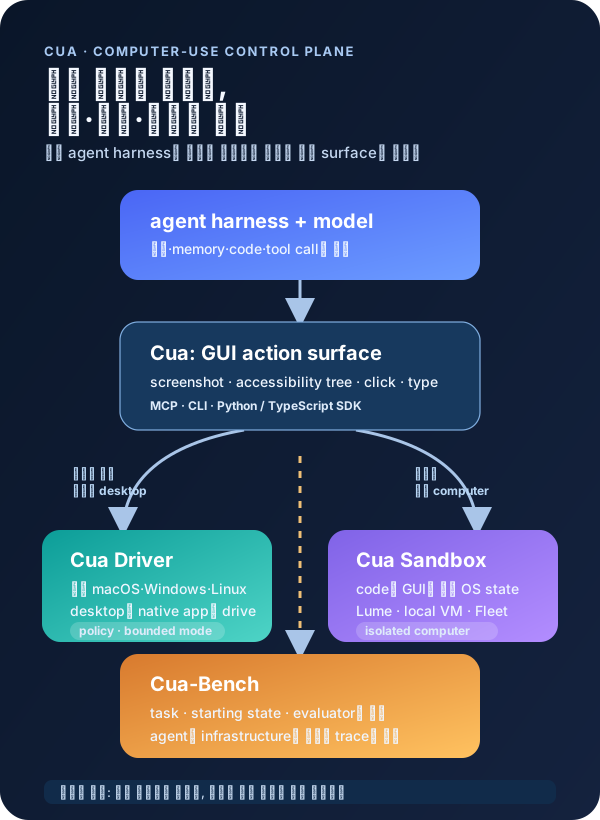
Cua는 이 runtime 층을 하나의 monorepo로 넓게 묶는다.[1] root README가 제시하는 구성은 open-source desktop automation, isolated cloud desktop, local macOS VM, specialist decision model, benchmark이며, 핵심 메시지는 agent에 “사용할 수 있는 computer”를 준다는 것이다.[1][3]
무엇을 해결하려는가
Cua가 말하는 Computer-Use 2.0은 agent가 화면을 보고 클릭하는 loop만을 뜻하지 않는다.[4] code 작성·실행, typed tool/API 호출, GUI 조작을 하나의 작업 안에서 고르고 넘나드는 model이며, GUI는 그중 필요한 action surface다.[4]
이 정의에서 computer-use model과 agent harness는 분리된다.[4] model은 observation에서 action을 제안하고, harness는 computer·memory·instruction·permission·feedback loop를 제공하며, Cua Driver는 이 harness에 붙는 UI tool layer다.[4][5]
따라서 Cua의 질문은 “어떤 model이 버튼을 잘 누르는가”만이 아니다. signed-in state가 남은 기존 machine을 쓸지, 새로 만든 isolated computer에서 run할지, 그리고 action trace를 어떤 task oracle으로 평가할지를 operationally 분리한다.[7][9]
핵심 아이디어 / 구조 / 동작 방식
1. Cua Driver: 기존 computer에 붙는 GUI runtime
Cua Driver는 macOS·Windows·Linux의 native application을 agent가 다룰 수 있도록 하는 background computer-use driver다.[5]
MCP over stdio와 CLI를 agent boundary로 두고, Python의 cua_driver 및 TypeScript의 @trycua/cua-driver SDK는 같은 in-process native runtime에 연결한다.[5]
관측은 screenshot과 accessibility tree, action은 click·type·scroll·keypress 같은 GUI input으로 이뤄진다.[4]
다만 Cua의 own docs도 Driver가 model을 선택하거나 실행하지 않는다고 구분한다. agent harness가 reasoning과 model을 맡고, Driver는 desktop action surface를 맡는다는 경계다.[4][5]
권한은 feature가 아니라 runtime dispatch boundary에 놓인다.[6] policy engine은 SDK·MCP·private worker·daemon의 public caller와 tool implementation 사이에서 call을 검사하며, policy에 명시되지 않은 tool은 deny-by-default로 막는다.[6]
standard, reviewed manifest로 tool·resource를 좁히는 bounded, 명시적 launch-time risk acceptance 뒤 제한을 없애는 unrestricted은 서로 다른 autonomy model이다.
하지만 permission policy가 screenshot output·network traffic·rate limit·caller identity까지 통제하지는 않으므로, policy만으로 host 보호가 끝나는 것은 아니다.[5][6]
2. Cua Sandbox와 Lume: agent가 쓸 별도 computer
Cua Sandbox는 remote desktop session이 아니라 code와 GUI를 함께 쓸 수 있는 full isolated computer로 설명된다.[7] shell·Python·PTY가 만든 file/process/OS state와 screenshot·accessibility tree·input event로 다루는 GUI state가 같은 guest 안에 있으므로, 코드로 setup한 상태를 UI로 검증하거나 UI가 만든 artifact를 코드로 검사할 수 있다.[7]
이 구조는 personal desktop의 signed-in state를 바로 자동화하지 않아도 되는 선택지를 만든다. local execution은 hardware 위에서 실행되고, hosted Fleet은 capacity pool과 claim으로 guest를 관리하며, 두 경우 모두 task별 guest lifecycle과 image contract를 분명히 해야 한다.[3][7]
Apple Silicon 환경에서는 Lume가 macOS와 Linux VM을 위한 CLI·framework 역할을 맡는다.[8]
README의 macOS Tahoe preset은 restore image에서 fresh VM을 만들고, unattended setup으로 lume user·SSH·autologin 같은 guest 설정을 만든다고 설명한다.[8]
3. Cua-Bench: action이 아니라 outcome을 비교하는 층
Cua-Bench는 task, starting state, agent interface, evaluator를 묶어 Linux·Windows·Android·browser·simulated environment에서 repeatable experiment를 실행하는 MIT-licensed framework다.[9] task는 단순 prompt가 아니라 environment setup·observation/action·final-state check를 함께 정의하고, provider·agent adapter·runner를 분리한다.[9]
이 분리는 같은 task를 다른 model과 infrastructure에 적용하고, trace·score를 비교하기 위한 조건이다.[9] repository의 package metadata는 cua-bench 0.2.11을 computer-use RL environment와 benchmark toolkit으로 패키징하고, test guide는 simulated Playwright environment 기반 E2E test와 unit/mock test를 구분한다.[9][10]
공개된 근거에서 확인되는 점
Cua repository는 2025년 1월 생성됐고 default branch는 main이며, 현재 root tree에는 Driver·Lume·Cua-Bench·CUA-S1뿐 아니라 Fleet, Python·TypeScript libraries, tests와 release configuration이 함께 들어 있다.[1][2]
즉 단일 desktop driver보다는 여러 OS와 execution mode를 포괄하려는 product-shaped monorepo에 가깝다.[1][2]
latest GitHub release는 2026년 9월 15일의 sandbox-v0.8.0이며, release note에는 Fleet에서 agent_type="osworld"로 OSWorld disk를 쓸 수 있게 한 기능과 image file size JSON-safety fix가 적혀 있다.[12]
태그 이름도 sandbox, driver, lume, bench, train, som 계열로 나뉘어 있어, 구성요소가 하나의 synchronized package보다 independent release stream에 가깝다는 신호다.[12]
license는 root LICENSE.md와 GitHub metadata 모두 MIT로 표시된다.[1][2][13]
반면 repo README가 link하는 CUA-S1-FORMS weights와 dataset은 별도 Hugging Face artifact이고, source tree의 Cua-S1 model card는 model family membership이 general computer-use capability를 뜻하지 않으며 checkpoint별 scope·evaluation·license를 따로 확인해야 한다고 경고한다.[3][11]
이 경계는 release를 읽을 때 중요하다.[11]
CUA-S1 component의 model card는 generic autonomy·production account의 unsupervised operation·high-impact action을 out-of-scope로 두고, isolated environment·least-privilege credential·bounded action·human confirmation을 deployment guidance로 제시한다.[11]
설치 전에 확인할 운영 경계
실사용 machine에 Driver를 붙이는 경우, browser profile과 local file·app state가 agent action surface에 들어온다.
Cua Driver는 existing logged-in Chromium profile attachment를 explicit grant로 두며, trusted process가 runtime owner일 때 policy를 우회할 수 있다는 trust-model 한계도 문서화한다.[5][6]
격리가 필요하면 Sandbox의 image와 lifecycle을 먼저 설계하는 편이 맞다. guest를 delete하면 state가 사라지고, snapshot/fork support도 backend와 path에 따라 제약이 있으므로, 결과 artifact export와 environment reset을 workflow의 일부로 다뤄야 한다.[7]
telemetry도 install decision의 일부다.
Cua Driver 문서는 content-free pseudonymous product telemetry가 default enabled라고 밝히며, cua-driver telemetry disable과 CUA_DRIVER_RS_TELEMETRY_ENABLED=false로 제어할 수 있다고 설명한다. telemetry opt-out과 GitHub Releases update check는 별도 setting이다.[14]
실무 관점에서의 해석
Cua의 차별점은 GUI를 하나의 MCP tool로 노출하는 데서 끝나지 않는다. real desktop에 붙는 Driver, disposable 또는 managed computer를 만드는 Sandbox·Lume·Fleet, 그 위에서 task success를 independent evaluator로 정하는 Cua-Bench를 함께 놓아, computer use의 실패 원인을 model·permission·environment·evaluation으로 나눠 볼 수 있게 한다.[3][7][9]
그래서 도입의 첫 선택은 “이 agent에 GUI 권한을 줄 것인가”가 아니라 어떤 state에서, 누구의 permission으로, 어떤 postcondition을 확인하며 GUI를 쓰게 할 것인가여야 한다. local Driver는 existing application·account·file을 써야 할 때, Sandbox는 fresh isolation이 필요한 작업에, Cua-Bench는 UI automation을 capability demo가 아니라 repeatable experiment로 바꾸고 싶을 때 가장 분명한 역할을 가진다.[6][7][9]
Cua는 wide surface area를 가진 빠르게 변하는 repository다.
따라서 production adoption에서는 latest component release, OS support boundary, permission manifest, telemetry setting, evaluator coverage를 한 덩어리로 review하고, 모든 consequential action에는 independent verification과 human gate를 남기는 접근이 적절하다.[6][9][14]